• Link to Facebook
  • Link to X
  • Link to LinkedIn
  • Link to Xing
  • Link to Youtube
  • LOGIN
  • Deutsch Deutsch German de
  • English English English en
INFO: +41 41 630 39 90
Thomas Skipwith ¦ Präsentieren wie ein Profi!
  • About us
    • Thomas Skipwith
    • DESCUBRIS Institute
    • Customer testimonials
    • Press kit
    • We donate
  • Shop
  • For Companies
    • Keynotes
    • Corporate trainings
    • Pitch Practice
    • Presentation Skills Coaching
  • For Individuals
    • Presentation Skills Coaching
    • Recommended Partners
  • Do’s and Dont’s
  • Blog
  • Books
  • Contact
  • Click to open the search input field Click to open the search input field Search
  • Menu Menu
  • Shopping Cart Shopping Cart
    0Shopping Cart

Online presentations are here to stay. (Tips part 4)

6. August 2020/by Thomas Skipwith

Online meetings and online presentations are here to stay. With this in mind, I want to give you a another few tips on how to make your online presence better.

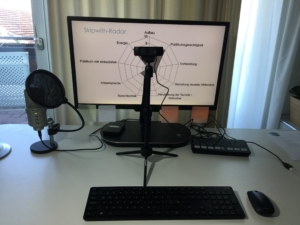
Look into the camera using a tripodNebula tripod

We’ve already talked about this: look into the camera or webcam during your online presentation. This is not always easy. Because when you show PowerPoint slides, the slides are usually either below or above the camera. I like the recommendation of Markus Hofmann (from unvergesslich.de): Put the camera in front of the screen. Then you can see your slides in the background – similar to a teleprompter. But even then, a conventional tripod obscures the view to a large extent. That’s why I bought the tripod from Nebula Capsule (affiliate link). This tripod is so slim that it lets me see much more of the slide behind it than a conventional tripod. This way I can keep eye contact with my virtual audience much easier.

Interaction with Mentimeter.com

Interaction keeps your audience engaged. There are many ways to keep your audience engaged. Here is a recommendation that has often been well received: Mentimeter.com. With Mentimeter.com, a query is presented in a particularly attractive visual way. It’s explained briefly in this YouTube video: https://youtu.be/Sd0fAenuAnw (duration: 1:30 min.).

Query with Google Forms

Do you want feedback from your participants? Then I recommend you to collect the feedback with Google Forms. The result will be shown to you free of charge as a summary or individually. Here is a short explanatory video: https://youtu.be/xEY10Ub-k-U (duration: 3:30 min.).

Summary

The right tripodmakes it especially easy to look into the camera, build in interactions e.g. with Mentimeter.com and collect feedback with Google Forms.

I wish you success for your online meetings, online presentations and video conferences. Keep at it!

Thomas Skipwith

P.S.: You can get better by attending one of our online or classroom trainings. More info.

P.P.S.: You can find more useful tips and tricks in the book “30 Minutes Online Meetings” (in German).
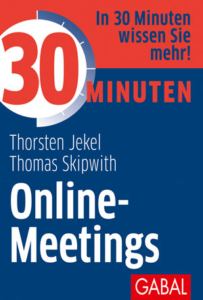

Online Meetings: This is how it is done!


Share this entry
  • Share on Facebook
  • Share on X
  • Share on Pinterest
  • Share on LinkedIn
  • Share on Tumblr
  • Share on Vk
  • Share on Reddit
  • Share by Mail
https://thomas-skipwith.com/wp-content/uploads/Nebula-Stativ-III-scaled.jpg 1920 2560 Thomas Skipwith https://thomas-skipwith.com/wp-content/uploads/Logo-Thomas-Skipwith-white-3.png Thomas Skipwith2020-08-06 11:38:592024-04-15 11:56:22Online presentations are here to stay. (Tips part 4)
You might also like
Auto mit Lego-Motor Spice up presentations: 5 AI tools for professional images in seconds
Online Meetings Englisch Cover Put your words into action.
Jahresabschlussrede Master your year-end speech: 5 tips for managers
Zwei Schwerter, die sich kreuzen als Analogie für die Frage, was besser ist: PowerPoint oder Prezi PowerPoint or Prezi: Which is better?
How to get the technology running. Technical glitch during your presentation? This one trick saves you – in 100 seconds.
Besinnliche Stimmung: Kerze Christmas – once particularly contemplative

Search

Search Search

Recent Posts

  • Flexibility saves your presentation – even when the wind changes
  • Audience analysis: the secret weapon of successful presentations
  • Ronny Chieng: Three lessons we can learn from his speech at Harvard
  • Presenting authentically badly – please don’t!
  • Technical glitch during your presentation? This one trick saves you – in 100 seconds.

Recent Comments

    Thomas Skipwith

    Thomas Skipwith helps executives, companies and individuals to present like a pro and avoid losing business and reputation through poor and boring presentations.

    He is a regular speaker at major events and a five-time winner of the European Championship of Public Speaking.

    Offerings

    • Blog
    • Shop
    • Keynotes
    • Corporate trainings

    Don't click here!

    Confidential - Don't click here!

    Contact

    DESCUBRIS Ltd.
    Thomas Skipwith
    Bachmattstrasse 10
    CH-8966 Oberwil-Lieli (near Zurich)

    T: +41 41 630 39 90
    E: speak [aet) thomas-skipwith.com

    Schedule a call
    © Copyright 2017 - Thomas Skipwith
    • Imprint
    • Privacy Statement
    • Terms & Conditions
    Link to: Never again speechless – with the little book Impromptu Speaking made simple! (2nd edition) Link to: Never again speechless – with the little book Impromptu Speaking made simple! (2nd edition) Never again speechless – with the little book Impromptu Speaking made...Impromptu speaking made simple! (2nd edition)DESCUBRIS Ltd. Link to: Armin Laschet versus Friedrich Merz: This is where the speakers’ chaff is separated from the wheat. Link to: Armin Laschet versus Friedrich Merz: This is where the speakers’ chaff is separated from the wheat. Armin Laschet Bewerbung 2021Armin Laschet versus Friedrich Merz: This is where the speakers’ chaff...
    Scroll to top Scroll to top Scroll to top